Local Markdown · Offline Mermaid · mdBook
mdview read connected Markdown documents locally.
Render a Markdown file in your terminal or as standalone HTML, or build a navigable mdBook from related project documents. Generated navigation and embedded Mermaid keep the book useful offline.
go install ubunatic.com/mdview@latestProject snapshot · measured 2026-10-26
Key facts
12-week commit activity
2026-10-26View 12-week data table
| Week starting | Commits |
|---|---|
| 2026-08-03 | 1 |
| 2026-08-10 | 0 |
| 2026-08-17 | 0 |
| 2026-08-24 | 1 |
| 2026-08-31 | 1 |
| 2026-09-07 | 0 |
| 2026-09-14 | 0 |
| 2026-09-21 | 0 |
| 2026-09-28 | 0 |
| 2026-10-05 | 1 |
| 2026-10-12 | 0 |
| 2026-10-19 | 0 |
Key Features
- Renders one Markdown file in the terminal or as a standalone HTML page.
- Builds navigable mdBook sites with offline Mermaid text-to-diagram support.
Stack
Go 1.25, Cobra, cati, mdBook, embedded Mermaid JavaScript
Why mdview
Read project docs without assembling a book by hand
Project documentation is spread across related Markdown files. mdview discovers them from one input file, organizes their frontmatter into a table of contents, and delegates multi-page HTML rendering to mdBook. Single-file terminal and HTML previews keep small reading tasks simple.
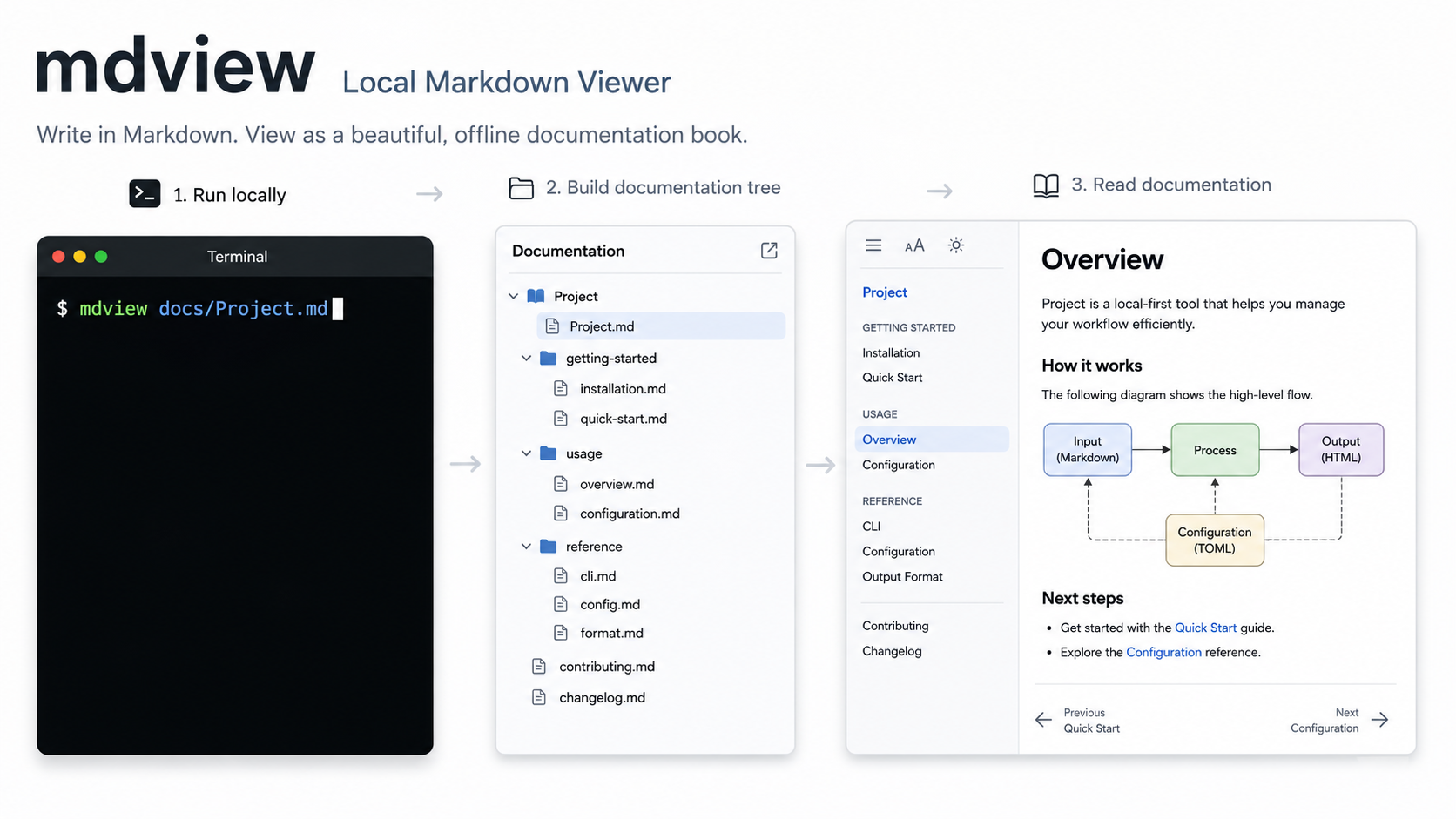
Workflow preview
From Markdown to a local documentation book
What mdview Offers Now
What mdview Offers Now
The current project scope is intentionally narrow: manage local Markdown docs as an mdBook, with generated navigation and offline Mermaid rendering.
Doc Discovery
Starts from one Markdown file, finds a project root, and gathers related docs while skipping cache and dependency directories.
Generated mdBook
Creates book.toml, SUMMARY.md, and a mirrored source tree under .cache/mdview, then runs mdbook build.
Offline Mermaid
Embeds local Mermaid JavaScript assets into the generated book so diagrams work without CDN access.
Frontmatter Hierarchy
Uses title, parent, and weight frontmatter to shape the mdBook summary and automate ToC creation.
Local & HTML Preview
mdview SomeDoc.md renders Markdown and inline images directly in your terminal; --html produces a standalone single-file preview, and mdview book open builds the full mdBook.
Small Go CLI
The implementation stays compact, avoids Electron and TypeScript, and uses external tools only where they already fit the job.
How It Works
How It Works
mdview renders single files to the terminal or standalone HTML, or prepares a project workspace and lets mdBook do the final multi-page HTML rendering.
- Input a Markdown file such as
SomeDoc.md. - Discover the project root and related documents.
- Summarize frontmatter into
SUMMARY.md. - Build with
mdbook build .cache/mdview. - Open the generated local HTML.
mdview docs/Project.md
mdview docs/Project.md --html
mdview book open docs/Project.md
Terminal output includes ANSI text and cati images. --html produces a standalone single-file preview; book open builds the whole-project mdBook under .cache/mdview/book. Serving a local book uses 127.0.0.1.
A sample whole-project book run reports its discovered pages and local output:
root /home/uwe/projects/mdview
pages 5
built .cache/mdview/book
opened .cache/mdview/book/docs/Project.html
Where This Is Going
Where This Is Going
The long-term direction is broader than mdBook: mdview should become a Markdown docs browser that feels like cat plus tree, but interactive and built for connected documentation.
Like cat and tree, but for Markdown projects.
- Support other Markdown browser/render targets beyond mdBook.
- Provide an interactive terminal docs browser with fast tree navigation.
- Render Mermaid in the terminal with smart ASCII or Unicode art output.
- Keep local-first behavior, offline operation, and small memory use as design constraints.
Project details
Architecture
Layer composition
- Terminal
- ANSI rendering
- Desktop
- —
- Inference / AI
- —
- Containers / VM
- —
- Web
- standalone HTML, mdBook
Engineering story
mdview: the story behind the project
Most software projects already have useful documentation. The friction is getting from a file in a checkout to a readable view: a browser-based book needs navigation, diagrams should work offline, and opening a full browser is overkill when…
Read the engineering story