
Linux emoji picker
emojig
A Linux emoji picker for your terminal or desktop. One Zig binary opens an inline terminal picker or a floating window, with no background service. Try its interactive shell-widget simulator below.
curl -fsSL https://ubunatic.com/emojig/install.sh | shProject snapshot · measured 2026-10-26
Key facts
12-week commit activity
2026-10-26View 12-week data table
| Week starting | Commits |
|---|---|
| 2026-08-03 | 20 |
| 2026-08-10 | 19 |
| 2026-08-17 | 0 |
| 2026-08-24 | 1 |
| 2026-08-31 | 7 |
| 2026-09-07 | 1 |
| 2026-09-14 | 16 |
| 2026-09-21 | 0 |
| 2026-09-28 | 0 |
| 2026-10-05 | 4 |
| 2026-10-12 | 0 |
| 2026-10-19 | 5 |
Key Features
- One binary includes 2,249 emojis and opens inline or in a desktop popup.
- Search spans multiple words and handles plurals, such as finding “car” for “cars”.
- Mouse and keyboard controls, light and dark themes, and clipboard copy.
- Crash handlers restore terminal settings if the picker exits unexpectedly.
- A browser demo uses the same search rules and is checked against the native picker.
Verified Engineering Milestones
- Website search matches the terminal's box-drawing emoji rules (#071, 96e62ec, 658cb7e)
- ARM64 release build fix and v0.2.1 release (#070, 0dad63d, fb619ef)
- Flicker-free terminal frames (d24100f)
Stack
Zig 0.16 runtime, Go 1.25 tooling and tests, YAML specs, JavaScript simulator, Wayland/X11, terminal emulators
Why emojig
An emoji picker that stays close to your workflow
Desktop emoji pickers usually belong to a particular desktop, while browser based pickers pull you out of the terminal. Emojig is a small Linux app that works inline in your shell or as a floating desktop window, using the same embedded emoji data and search behavior in both modes.
Playground
Try the interactive simulator
Capabilities
Designed for terminal and desktop use
- One binary includes 2,249 emojis and opens inline or in a desktop popup.
- Search spans multiple words and handles plurals, such as finding “car” for “cars”.
- Mouse and keyboard controls, light and dark themes, and clipboard copy.
- Crash handlers restore terminal settings if the picker exits unexpectedly.
- A browser demo uses the same search rules and is checked against the native picker.
Recorded demos
Terminal and desktop picker
Screenshot
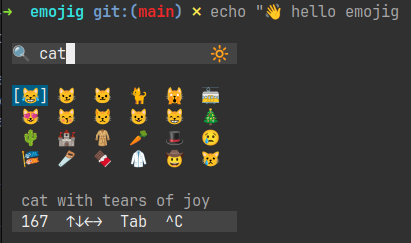
Search in the terminal
emojig running in a terminal
Install
Get started
Install the latest Linux release with the project installer:
curl -fsSL https://ubunatic.com/emojig/install.sh | shThe installer selects the supported Linux architecture, downloads the current Codeberg release, and installs emojig and its shell completions under your home directory.
Project details
Architecture
Layer composition
- Terminal
- TUI, synchronized output, raw mode
- Desktop
- Linux, Wayland/X11, clipboard
- Inference / AI
- —
- Containers / VM
- —
- Web
- JavaScript simulator
Engineering story
emojig: the story behind the project
An emoji picker sounds like a small interface problem: show a grid, let someone search, copy a character. On Linux, the details quickly multiply. The same picker should fit into an existing terminal session or appear as a desktop popup; ren…
Read the engineering story